ChatGPT vs Copilot
| 25 min read
I've been using both ChatGPT4 and Microsoft Copilot for a couple of months. Weirdly, I couldn't find a single post by anyone who had reviewed their experiences of it. So, I thought I'd throw in my two cents.
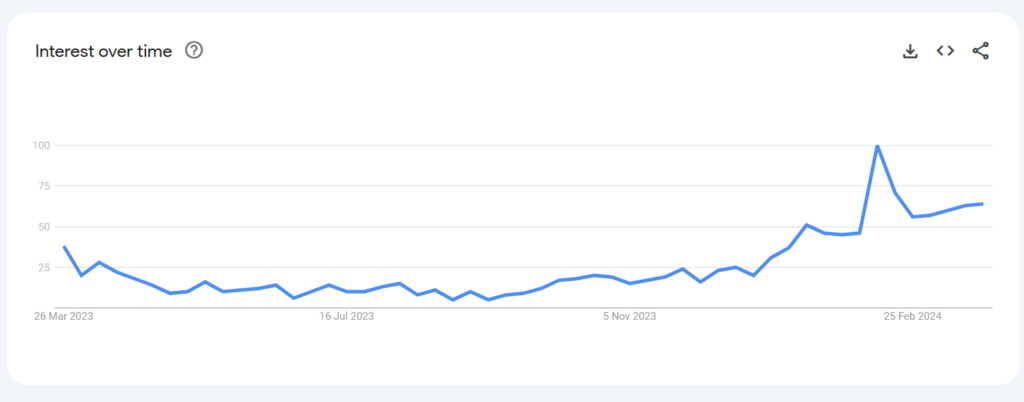 Google Trends graph showing interest in the search term "Copilot vs ChatGPT" over the last 12 months.
My main takeaway is that, as with a lot of technology, "which tool is better?" depends entirely on what you're using it for. If you want the spoiler alert right up top, I end up deciding that, if you aren't already embedded in Microsoft 365, for the average person ChatGPT will likely be the better call. There are quite a few caveats though, so do read on.
For clarity's sake, throughout I'm talking about OpenAI's ChatGPT-4, and Microsoft's Copilot for Microsoft 365.
As well as some general observations about the benefits, I talk through two real-world tasks that I've done in the last month, to give a sense of where you might see the platforms limitations.
Let's dive in!
Test 1: Working with Excel data
Over at Esmée Fairbairn Foundation, we're in the process of running a Youth Led Creativity Fund, and part of my work for that is to design and build the infrastructure behind it. Last week, this included allocating the 10 judges from our Involving Young People Collective to the 350-something applications we received for the fund.
There are lots of ways one might choose to tackle this challenge. As the Technology Lead at the Foundation though, I've paid for a Copilot license to test out exactly what this can do. So I figured why do any real work myself?
It's a myth that getting AI means you don't have to do any work.
There are some stipulations to the allocations:
-
Each application must be judged by two judges.
-
We do not want to repeat judging pairs too often.
-
And, as the final stipulation that you don't have to tacitly acknowledge to humans, but you do to computers, a judge cannot assess the same application twice.
I had all the applications in a spreadsheet, so Copilot seemed like the obvious play here. One of the major selling points of Copilot is that it sits right in your Microsoft 365 apps.
So how did Microsoft's Copilot do?
So, here's the prompt I ran for Copilot for Excel:
In Table 1 there are 350 applications, each of which needs to be assessed by two judges. The names of the judges are in Table 2. Can you assign two judges to each application - using columns C and D - making sure that no judging pair is used more frequently than others, and that no judge assesses the same application twice?
And so Copilot got to thinking. And then it did a bit more thinking. And then, for good measure, it thought some more. Finally, Copilot spits out an answer. Great!
It can't make any edits to the spreadsheet itself. Less great. But it will tell me what I need to do. That's fine - giving me a formula is still taking some of the grunt work off me, so I'll take it. What follows is a long answer about needed to create random numbers for each judge, and then using those numbers it can assign judges to each application. I don't fully understand this, but that's what I'm paying the AI for, so I do what it asks. The instructions themselves are relatively clear, though it's still annoying that it can't do any of this itself.
I follow the instructions for both columns, and viola! It does it perfectly! For the first 10 applications. Then the spreadsheet throws up the dreaded #REF! error for each of the following 340-something. Not ideal.
So, I plug my own brain back in and realise that it has assigned the 10 judges to the first 10 applications, but that the formula doesn't account for the fact that the judges need to have more than 2 applications each.
So, I go back to Copilot to explain the little misunderstanding. It offers some sincere apologies and then reworks the formula for me. Back and forth this goes for a little while, with none of the options working.
I'm wasn't getting anywhere, so eventually I simplified the problem. I didn't need AI to assign both judges. Because each judge is assessing roughly the same number of applications, I can just use the old drag cell method to assign judges in repeating order for the first column. Once I've done that, I just need Copilot to assign the second judge. Surely that's easier?
Reader, it was not.
Even after a few more exchanges, it kept giving me broken formulas. I don't mean that the formulas gave me the wrong information. I mean that the syntax of the formula was incorrect. I know enough about Excel to work out where the formula didn't work, so after a little manual effort I fixed it myself and ran it. But even when the formula gave an output, it was repeating judging pairs with almost perfect consistency.
I went back to Copilot, gave it the fixed formula, and reminded it that I needed to mix up the judging pairs as much as possible. At that point, Copilot basically gave up, and offered me the start of a VBA script that might get me some of the way there.
I'd spent nearly half an hour trying to get this to work, and it was rapidly becoming apparent that either I'm not good at prompt engineering, or Copilot just fundamentally wasn't capable of providing what I needed. Now, clearly, I'm a fantastic prompt engineer, as those of you who have read my AI-generated Billy Joel homage will know.
So I gave up on Copilot, and decided to see what ChatGPT could do...
Using OpenAI's ChatGPT
Before I get into my experience with ChatGPT, there's a very important point I need to make. While using Copilot, all of the data I was working with remained within my organisation's infrastructure. Our Privacy Policy doesn't yet mention anything about ChatGPT, so I didn't have consent from either the applicants or the judges to upload their data to that third party. So, before I did anything, I needed to anonymise the data. This wasn't difficult or particularly time-consuming, but I mention it for two reasons. One, it was another step I had to take, and that speaks to my point about AI not always being the quick and easy silver bullet. Two, it's a very important step that a lot of organisations or individuals might not think to take.
Anyway, with a new spreadsheet of anonymous information, I hit up ChatGPT with the following prompt.
I have a spreadsheet of applications that I need to allocate judges to. I've already allocated the first judge, but I need to allocate a second one. Each application cannot be judged by the same person twice, and I want to minimise the number of times a judging pair is repeated. The spreadsheet has the allocations on a sheet called "Allocations", and the Judge names on a sheet called "Judges". Please can you fill out the "Judge 2" column on the allocations sheet with allocations.
Again, at the risk of labouring the point, what I'd actually given it was a list of unique IDs pulled from our organisation's CRM instead of the names of the applications, and a list of "Judge A, Judge B, Judge C...." instead of the names of the judges. This doesn't matter to the AI - it's just sorting data. But it gets me what I want (minus a little script work at the other end) without having to give the names of either organisations or people to a third party application.
As you can see, I'd jumped straight into "easy mode", giving ChatGPT the spreadsheet with Judge 1 already allocated. It made my life easier because a) I already had the sheet there, and b) it meant I had to think less hard about the prompt I was giving.
ChatGPT responded immediately, saying:
Certainly, I can help with that. Please upload the spreadsheet you mentioned. Once I have the file, I can analyze the existing allocations and propose a second judge for each application, ensuring that no application is judged by the same person twice and that judge pairs are not often repeated.
What I liked about this response was that it was explaining back to me what it was going to do in very clear terms. It had understood what I needed.
ChatGPT confirms what you're asking of it, and then lets you know how it's going to do it.
So I uploaded my anonymised spreadsheet and let ChatGPT do its thing. It spent a lot of time analysing. To be fair to Copilot, ChatGPT took as long, if not slightly longer, to come back to me. I thought about giving a point to Microsoft for that but then remembered that the whole reason I was using ChatGPT was because Microsoft couldn't do what I'd asked. I kept the point.
Slightly less than an eon later (not quite 5 minutes), I got the following response:
I have allocated a second judge to each application, ensuring that no judge is assigned to the same application twice and minimizing repeat judge pairings. You can download the updated spreadsheet using the link below:
Yes, that's right, not only had it done the calculations for me, but it had put it all into a nice new spreadsheet for me to download and use.
Of course, I needed to go back in and un-anonymise the data again. But compared to manually allocating 10 judges to 350 applications, this seemed like a huge win. All told, including the time it took me to anonymise the table, write the prompt, wait for ChatGPT to do the work, un-anonymising the output, and lastly do some spot checks to make sure it had given me what I needed, no more than 15 minutes went by.
The winner: ChatGPT (by a lot)
I don't know how long it would take me to have done this manually. I don't mean manually-manually - adding 10 judges to 350 applications, making sure as few repeated pairs as possible would have taken me all day. What I mean is that I don't know how I would have gone about that from a formula perspective. Before turning to AI, I had tried with PivotTables, but I didn't get very far. I could have Googled it, I'm sure, or brought in one of my data colleagues. But Googling would have eaten into my day, with no immediate promise of success. And bringing in a colleague means taking up their time and capacity. The point of AI is to free up capacity in exactly this kind of way.
And if that is the metric, then it's clear that ChatGPT is the winner. Even if Copilot had given me the right formula, without too much fuss, it was still a comparatively manual process. As it was, I had to really work to get any output at all. With ChatGPT, I told it what I wanted, I gave it the data, and then I didn't even have time to make myself a cup of tea before it had done the work for me.
But this was a specific scenario that isn't going to be something everyone does day-to-day. What about all the other stuff your average office worker might do?
Copilot is built into your Microsoft environment
Maybe my first use case was a little taxing for something that is still technically in preview. But one of the big selling points is that Copilot sits across your whole Microsoft organisation. There's even a dedicated Copilot chat pinned to the top of your Teams application.
Microsoft has been gearing up for this kind of integration for years. In fact, "AI" products have been part of the Office 365 platform for a while now. If you've ever used the PowerPoint designer tool, that is by a broad definition Generative AI. Even before Office 365, anyone who used Word in the late 90s and kept having to tell Clippy "No, I'm not writing a letter, get lost!" will know that we've had the power to do low-level AI-based generation for decades.
 Clippy, who walked so Copilot could walk slightly faster.
If I ignore my little issue with Excel - which again, to be fair, Microsoft does say is in Preview - there are dozens of other use cases where Copilot could make my life easier. With this in mind, I dove into the Teams chat function.
I'd been having some back and forth with a colleague from finance about an upcoming audit. There was a particular document I wanted to get hold of, and I knew he'd emailed it to me a couple of weeks ago. I could have just searched Outlook, but everybody knows that's a good way to lose 2 hours to fruitlessly rewording your search terms. I know it's terrible practice to use Outlook as a repository for files. I know that as soon as I get an attachment that I know will be useful, I should load it up into SharePoint. I know that. You know that. But come on, who actually does that? Really? And besides, why can't Microsoft just give us an email client that has good search functionality?
Well, with Copilot, we don't need one! I can ask it for something, and it will search the whole of my infrastructure to give me contextually useful information. Except, it can't... When I asked Copilot in Teams to fetch me an email I knew that our auditors had sent us, it spent nearly 2 full minutes searching before it told me that it couldn't find anything. I hopped over to Outlook and found the email in less than 30 seconds.
Ok, so that's not a win either. Maybe let's give it a different type of task...
Test 2: Planning my day
Unlike the Excel problem, which I genuinely needed to get done and therefore have only really thought of as a head-to-head test retrospectively, for this I wanted to be a little more rigorous. We'll see how that went...
I gave both tools the same prompt: "Act as my personal assistant and help me plan my day. Here are the things I need to get done..." followed by a list of about 10 things, each with a rough amount of time for how long I thought it might take ("look into Microsoft Planner as an alternative to Jira - 40mins", for example).
Copilot has access to my calendar, whereas ChatGPT does not. Clearly, the advantage here, from a real-world use case scenario, should go to Microsoft. For Copilot, I added the line "The things already in my calendar are immovable". For ChatGPT, I added "I also have the following meetings in my calendar:..."
The results for both were... mixed...
Copilot
Copilot identified the commitments already in my calendar and worked around them. In the order that I'd given the tasks, it printed out a schedule that filled in the gaps around my meetings. When it got to 6pm, it told me that I could "...also use the time after 6 PM to complete the remaining tasks on [my] to-do list". This, to me, seemed like a good result. I hadn't specified any priorities, so it makes sense that it ran the schedule in the order I gave the tasks.
Except... it didn't put them into my calendar. When I followed up and explicitly asked it to do so, it told me that it was unable, and gave me instructions for how to do it myself. There seems to be a real hit-and-miss set of rules that dictate which parts of your environment Copilot can interact with directly. I understand it not being able to delete events, for example. What if it mistakenly deletes something important? But adding them surely can't be a world-ending situation, can it Microsoft?
I think this one irked me more because what is the point of a digital assistant if I still have to do most of the legwork? I use time-blocking quite a lot to manage my day. So by the time I've explained all of the tasks I have to Copilot, if it then needs me to put them in the Calendar myself the whole process is pointless.
An AI assistant is only so useful, if you still have to do most of the legwork.
To be honest, it annoyed me so much that I didn't even bother trying to make changes to the prompt. I moved straight onto ChatGPT. So much for a rigorous head-to-head.
ChatGPT
Much like Copilot, ChatGPT gave me a breakdown of my day with tasks in the order I had given them. Unlike Copilot, it had formatted it nicely into morning, afternoon, and evening sections. ChatGPT had even put in a half-hour lunch break at midday, and 30 minutes at the end of the day to "Wrap up and review tasks for the day". How nice of it. I suppose this was its way of directly responding to the "Act as my personal assistant" part of the prompt.
And then things got weird. I followed up with the prompt "I also need to walk the dog for half an hour at some point this afternoon, can you fit that in?". It had already put some of my meetings into the evening, lacking an apparent sense of work/life balance (adding lunch aside), I assumed it would just shove in "3.30-4pm: Dog walking" and move everything else back 30 mins. It's what I would have done.
It did not do that. In fact, in the Evening section, it provided me with the following:
Morning:
10:30 - 11:00: All-hands meeting
11:00 - 12:00: Sort out email templates...
12:00 - 12:30: Lunch break
Afternoon:
12:30 - 13:30: Call with...
13:30 - 14:00: Sort out...
14:00 - 14:15: Change address with...
14:15 - 14:45: Look into MS Planner as an alternative to Jira
14:45 - 15:25: Look at credits for Azure storage
15:25 - 15:35: Pay outstanding...
15:35 - 15:50: Check in with...
15:50 - 16:05: Pay...
16:05 - 16:20: Follow up on...
16:20 - 16:30: Wrap up and review tasks for the day
Evening:
14:30 - 15:00: Walk the dog
The formatting has been amended slightly, and some entries have been redacted.
It had left the afternoon section untouched, leaving in the previous schedule across the 2.30pm-3pm slot. ChatGPT obviously understood that I needed 30 mins to walk the dog, and that it needed to be in the afternoon, as it assigned the 2.30-3pm time to it. But it then just tacked it onto the end of the day, rather than amend what else was going on.
At first, I thought maybe ChatGPT had some kind of moral aversion to me running a personal errand in the middle of the afternoon. So I switched it. I gave it the follow-up prompt: "I've got a dog-walker now, so I don't need to walk the dog. However, I now have a conference call that runs from 2.30pm to 3pm. Can you adjust my schedule?". "Of course!" The answer immediately came back, before it gave me the same output but replacing "Walk the dog" with "Conference call" in the evening slot.
I tried several different prompts, each as unsuccessful as the last. Eventually, I shut down that chat window and opened up a fresh one, giving it roughly the same initial prompt, but putting the conference call in from the start. It handled that mostly correctly, though it put the call in at the end of the day despite my telling it that it was fixed for 2.30pm. Once I clarified that though, it sent me back an amended schedule with no errors - though interestingly it no longer split it into Morning, Afternoon, and Evening segments. I even asked it to rearrange the tasks so that the Azure credits task was earlier in the day, and it amended the schedule fine. Just for giggles, I threw the dog walking question back in ("I forgot that I need to walk my dog for 30 mins this afternoon. Can you schedule that in?"), and it put that in for 3.30pm and arranged everything else around it. As a final test, I asked it to put it just after lunch instead. It put it in for the morning, but when I asked it to correct itself, it did.
The winner: ...no one?
I liked that ChatGPT added in little things like a lunch break and time to wrap up at the end of the day. Most of the time, it looks like it can handle the task pretty well. However, from the looks of it if ChatGPT trips itself up it can be hard to put it back on track.
As for Copilot… I struggled with this. I'll come onto this more in a second, but from a financial point of view it is a larger commitment (you have to buy a one-year license). On top of that one of the major selling points is that it sits within your Microsoft infrastructure. But if it can't add things to my calendar for me, what is the point? ChatGPT can't do this either, but it doesn't claim to be integrated.
To be fair, this is perhaps a slightly contrived test scenario. So I thought a little more about how I would actually use a service like this. I opened up a new Copilot chat and gave it the prompt "Someone's asked for a call at 3pm. Do I have time, and if so can you put a hold in my calendar." 45 seconds later (yes, I timed it) it came back to tell me that I already had a call at 2pm that looked like it would run until 3.30, and therefore I would be unlikely to make the 3pm call. It also confirmed that, even if I had the time, it couldn't put the hold in for me, as it was unable to add things to my calendar. I reset my stopwatch and then timed how long it took me to open up my Calendar, look at the 3pm slot, and then add a hold into that time anyway. 12 seconds. I also saw that in that time slot I had a conflicting meeting at 3pm anyway, which Copilot didn't tell me about.
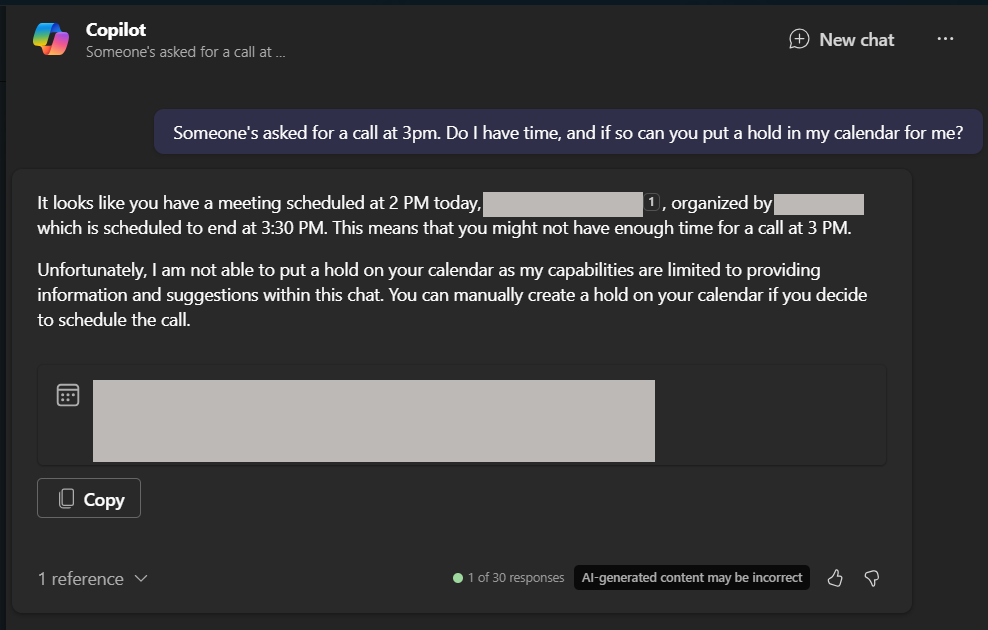 Screenshot of Copilot's response to a query about my availability for a call.
So what is Copilot good for?
I think, to be honest, the majority of the use I've got from Copilot is in summarising things. I get brought into long email threads relatively often, and instead of having to read through 30 emails to get a sense of what's going on, a click of the Copilot button in Outlook gives me a decent summary to get started.
Copilot really shines in Teams meetings.
Similarly, one of the absolute best uses I've had for Copilot has been as an assistant in Teams meetings. If you record calls and enable transcripts, Copilot can offer real-time summaries of what's being said, alongside citations and direct quotes. Once the meeting has ended, you can review summaries and action points, even splitting it out by person. If you were in an entirely Teams-based meeting - by which I mean everyone on the call has signed in, rather than a Hybrid situation where some of your team are together in a room and others are dialing in - you can see breakdowns of how much each person spoke, and click through visual representations of what was said when so you can see the recording for yourself.
Of course, there are caveats to all of this. The first, and most obvious, is that you need to be having a Teams call for this to work. If your organisation isn't already on Microsoft, this is going to be a big investment. Even if you have Microsoft 365, but tend to use Zoom, or Slack, to run your meetings, paying for Copilot might not be the smartest move. Incidentally, Zoom does have an equivalent AI meeting assistant, which gets very good reviews. It also comes included with every paid plan, compared to Copilot's add-on fee.
The second major caveat is that the call needs to be recorded, which means you'll need permission from everyone on the call for that to be the case. This might well be fine for internal calls, but if you want to use Copilot to help you take notes on calls with clients, you'll need to adjust your Privacy Policies.
For someone in my position though, at an organisation that predominantly works with Microsoft products, Copilot for Teams is a game changer. I absolutely love it. For me, the summaries of the meetings alone are worth it, meaning you can pay less attention to note taking and be more present in the call. You can also query the notes after the fact, directly from the Teams app ("The meeting I had last Thursday about Data Privacy - what was Barry's point about the cost-benefit of external providers?").
So which should I get?
I so badly want to recommend Copilot. But while get a huge amount of value from Copilot for Teams, with regards to the rest of the platform…
I don't get the value of it as an AI chat assistant or as an omni-search for my organisation. I, personally, get zero value from it for PowerPoint and Excel (in fact it actively angers me for Excel). Word is a bit of a middle ground. I don't get a lot of use from it, but I think that is in large part because that is where ChatGPT and Copilot overlap so obviously. As someone lucky enough to have subscriptions to both, I tend to default to ChatGPT. If I didn't also have ChatGPT, I might get more out of Copilot for Word.
Beyond that though, if I were offering a recommendation to a small/medium sized organisation, I think my overriding consideration is that you can only buy Copilot as a yearly license. Yes, the two platforms cost roughly the same when you consider them over a year, but you have to buy the full year with Copilot. At a cost of £300 per user, this might not be the right call for an organisation looking to trial AI.
ChatGPT, meanwhile, lets you pay monthly - around £20 per user per month. For organisations concerned about cashflow, or who are only looking to trial AI for a couple of months before committing, ChatGPT feels like the better investment.
Naturally, there are caveats. Of course, if you aren't already in the Microsoft ecosystem, then this whole conversation is moot - between the two ChatGPT is the only logical choice. Equally, if the majority of your organisation spends most of its time on Teams calls and then writing up notes from those calls, then maybe you'll benefit more from Copilot.
It's also worth noting that, for all my personal experience, I have seen the technology work in live demos. Microsoft isn't outright lying about Copilot's capabilities. But these demos are in environments that have been specifically constructed to make the most of the AI tools. If you can get your organisation there, great! But if what you want is to dip your toe in the waters of AI to see how it might increase your org's productivity, you aren't going to want to first do a complete infrastructure overhaul to make that work.
ChatGPT is a little bit better at a lot more things.
At the end of the day, I find ChatGPT is more "generally" useful. There is pretty much nothing I've thrown at it in the last month or so that it hasn't helped me with. From coding, to content structuring, to tidying up my CV. I've even thrown some very complicated data management queries at it, and where it can't do it itself, it's helped me write the scripts to get the job done. What it lacks in terms of interoperability with other tools, it makes up for in just being better at replying.
It's also not just the accuracy of its responses. The way it responds to you feels more natural. Everything from the immediate response to the way it phrases answers feels more like you're talking to a virtual personal assistant. There is just a lower barrier to entry for ChatGPT.
For the average organisation, the overlap between what ChatGPT and Copilot can both do is too high to justify both platforms. On balance, the option of monthly licenses, and that it is more of a general tool, swings me towards ChatGPT as the better option for starting your Generative AI journey.
Want to chat about anything in this post? I'd love to hear from you!
Feel free to drop me an email
Or find me on Mastodon